Doing my bit to help advertise about the upcoming Malaysia Open Source Conference (MOSC) 2010 happening next week (29 June - 1 July 2010). I will be speaking on the topic of SUSE Studio and Mono on the second day.
MOSC homepage -> http://conf.oss.my/home.html
MOSC schedule -> http://conf.oss.my/schedule.html
MOSC speakers -> http://conf.oss.my/speakers.html
I have just completed installing SUSE Studio OnSite on my Thinkpad T61p over the weekend. Granted, I could use the freely available SUSE Studio on the Internet/WWW but I want to avoid any connectivity and bandwidth issues that usually dogged live presentations with demos. Doing my best to beat Murphy's law.
The whole process of installing & bringing SUSE Studio up was fairly smooth & straight forward. The only reason it took the whole weekend has more to do with downloading the various codebases (SLES 10, SLES 11, SLED 11) and their respective 32bit & 64bit repositories via the Subscription Management Tool (SMT) than getting the actual SUSE Studio app to work. Of course, it also helps to know one of the Senior Software Engineer behind it. This is a nod (and wink) to James Tan for providing good advise over email/IM, thus reducing my trial-n-error in customizing this specifically for MOSC. Thank you.
Over the next couple of days, I will be creating 2-3 appliances and prepping for demo walk-throughs. I will also be mucking about with some .NET webapp with Visual Studio and having it work on SLES 11 with Mono Extension. Hope to find the time to blog/document about it.
Showing posts with label Mono. Show all posts
Showing posts with label Mono. Show all posts
Tuesday, June 22, 2010

Friday, April 9, 2010
SUSE Engineering Quality: ASP.NET on IBM Mainframe
I experienced, first-hand, the Outstanding quality of SUSE Engineering today. Common Code-base has always been touted as a key differentiator with SUSE Linux Enterprise, where the same operating system is compiled (AutoBuild) and ready for a number of different hardware chipsets/platforms. The implication is that the latest & greatest code/patches will be simultaneously available for SUSE Linux Enterprise on x86 (32 & 64 bit) as well as IBM POWER, IBM System z etc.
With IBM System z (aka the Mainframe), its been said that SUSE Linux Enterprise runs natively & without any emulation layer. Further, there is approximately 1% of code change in the kernel due to the fact that the System z uses a different chipset.
All the above is true and I am personally convinced today. Why? Because I had the opportunity to work on a small virtual instance (512Mb RAM) of SUSE Linux Enterprise Server 11 (SLES 11) running on the legendary IBM System z10 BC this week. The machine is also hosting a number of other SLES 11 instances and traditional mainframe workloads (ie z/OS).
Previously, I wrote an entry on setting up mojoPortal (ASP.NET web app) on SUSE Linux Enterprise with the Mono extension (link). Using the exact same steps that I described, written & tested against my Lenovo Thinkpad (x86), I can achieve the same result on the IBM System z10 BC!
That's right folks, the only difference is I needed to install SLES 11 DVD for System z (s390x). Next, I used the exact same mojoportal rpm (noarch) & SLES-11-Mono-GM-DVD1.iso (noticed its hardware platform independent) that worked on my Lenovo Thinkpad. In less than an hour (the speed and throughput of System z is amazing), I've got everything up and running on SLES 11 on System z.
Interesting how we now have the option of running traditional LAMP stacks, Java workloads and .NET applications on SLES 11 on System z. Further, with database options of PostgreSQL, MySQL, IBM DB2, Oracle DB added to the mix... Wow, this opens up more options for server consolidation and the type of applications that can now be hosted on System z to achieve unrivaled uptime, vertical scalability, security and I/O throughput.
Sweeeeeet!!
With IBM System z (aka the Mainframe), its been said that SUSE Linux Enterprise runs natively & without any emulation layer. Further, there is approximately 1% of code change in the kernel due to the fact that the System z uses a different chipset.
All the above is true and I am personally convinced today. Why? Because I had the opportunity to work on a small virtual instance (512Mb RAM) of SUSE Linux Enterprise Server 11 (SLES 11) running on the legendary IBM System z10 BC this week. The machine is also hosting a number of other SLES 11 instances and traditional mainframe workloads (ie z/OS).
Previously, I wrote an entry on setting up mojoPortal (ASP.NET web app) on SUSE Linux Enterprise with the Mono extension (link). Using the exact same steps that I described, written & tested against my Lenovo Thinkpad (x86), I can achieve the same result on the IBM System z10 BC!
That's right folks, the only difference is I needed to install SLES 11 DVD for System z (s390x). Next, I used the exact same mojoportal rpm (noarch) & SLES-11-Mono-GM-DVD1.iso (noticed its hardware platform independent) that worked on my Lenovo Thinkpad. In less than an hour (the speed and throughput of System z is amazing), I've got everything up and running on SLES 11 on System z.
Interesting how we now have the option of running traditional LAMP stacks, Java workloads and .NET applications on SLES 11 on System z. Further, with database options of PostgreSQL, MySQL, IBM DB2, Oracle DB added to the mix... Wow, this opens up more options for server consolidation and the type of applications that can now be hosted on System z to achieve unrivaled uptime, vertical scalability, security and I/O throughput.
Sweeeeeet!!
Thursday, March 25, 2010
MojoPortal on SLES 11 with Mono Extension
MojoPortal (http://www.mojoportal.com) is an open source, cross-platform*, content management system (CMS) using ASP.NET as the web development language. Its intended for personal and commercial use and license under the Common Public License 1.0. You can read more on the motivations of the author here.
* - With Mono, cross-platform is a truer statement now.
On the Windows platform, you would require IIS (web server) with ASP.NET 3.5 SP1 and a database (usually MS SQL Server). With SUSE Linux Enterprise Server 11 and the Mono Extension, we have Apache2 (web server) with Mono 2.4 runtime and PostgresQL database as the counterparts.
This blog entry will show you in rather painless fashion on how to install MojoPortal on SUSE Linux Enterprise Server 11 (with the Mono Extension) and start using it. To help with reading efficiency, I have 2 sections, the first section is the Expressed version where I assumed the reader is skilled and proficient with SUSE whereas the second is the Expanded version where it will include more details and screenshots. Finally, a little more info/detail, my setup has SLES 11 with Mono Extension virtualized on top of SLES 11 Xen hypervisor.
As a next step, I would consider leveraging SUSE Studio to build a small MojoPortal appliance (thus eliminating the need for this journal) and users can simply download the entire workload (OS, App & Data) without doing any "wiring". Tempting... stay tuned...
Pre-requisite: You already have a "vanilla" SLES 11 installed with basic network access and software repositories setup (ie DVD or online through NCC).
Expressed/Summarized (aka for SUSE admins) instructions:
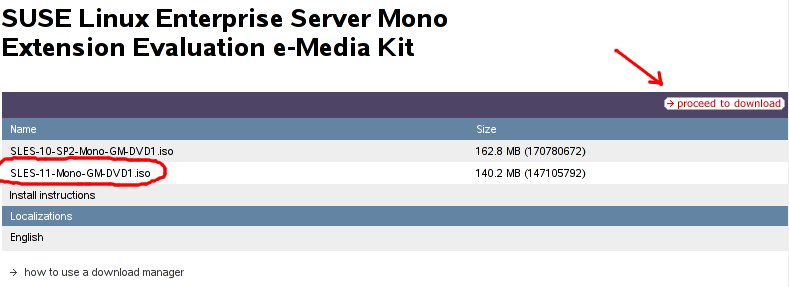
1) Download SUSE Linux Enterprise Mono Extension from this LINK. You only require the SLES-11-Mono-GM-DVD1.iso (140Mb). The other ISO (162Mb) is meant for the older SLES 10 SP2.
2) Download MojoPortal already packaged as an RPM from openSUSE.org. At the time of this entry, I downloaded and used mojoportal-2.3.3.1-3.6.noarch.rpm (12Mb) from this LINK. If link does not work, surf to http://software.opensuse.org/search and search for "mojo" with SLES/SLED 11 selected in the listbox.
3) Install (if not already) Apache2 web server: < zypper in apache2 >
4) Install PostgresQL database: < zypper in postgresql-server >
5) Install Mono Extension/runtime on top of SLES 11. Use YaST -> Software -> Add-On Products or < yast2 add-on > to install the Mono Extension, ISO you downloaded in step (1).
6) Install MojoPortal web application: < rpm -ivh --nodeps mojoportal-2.3.3.1-3.4.noarch.rpm >. The nodeps flag is required as the mojoportal RPM is still looking for the older version 2.0 of Mono. The official SLE 11 Mono Extension is at version 2.4.
7) Ensure PostgreSQL server is running < rcpostgresql start >, and proceed to configure PostgreSQL database for MojoPortal: < /usr/share/mono/asp.net/data/mojoportal-2.3.3.1/init >
8) Configure Apache2 web server for MojoPortal: < cp /usr/share/mono/asp.net/conf/mojoportal-2.3.3.1/mojoportal.conf /etc/apache2/conf.d/ > and edit the mojoportal.conf file in the /etc/apache2/conf.d/ directory < vi /etc/apache2/conf.d/mojoportal.conf >, put a # in front of the line < MonoServerPath mojoportal "/usr/bin/mod-mono-server2" > and remove the # in the following line < #MonoServerPath mojoportal "/opt/novell/mono/bin/mod-mono-server2" >. Restart Apache2 to have these configuration changes in effect < rcapache2 restart >.
9) Open a web browser and point to http://[hostname Or IP addr]/mojoportal . The initial startup will take awhile as MojoPortal initializes for the first time. Login as MojoPortal Administrator with ID admin@admin.com and Password admin.
10) To ensure Apache2 web server and PostgreSQL database server is always auto-started on reboot: < chkconfig -s apache2 on > and < chkconfig -s postgresql on >
For more usage knowledge, please see MojoPortal.com for details at http://www.mojoportal.com/documentation.aspx

Expanded/Detailed (aka for those new to SUSE) instructions:
1) Download SUSE Linux Enterprise Mono Extension from this LINK. You only require the SLES-11-Mono-GM-DVD1.iso (140Mb). The other ISO (162Mb) is meant for the older SLES 10 SP2.
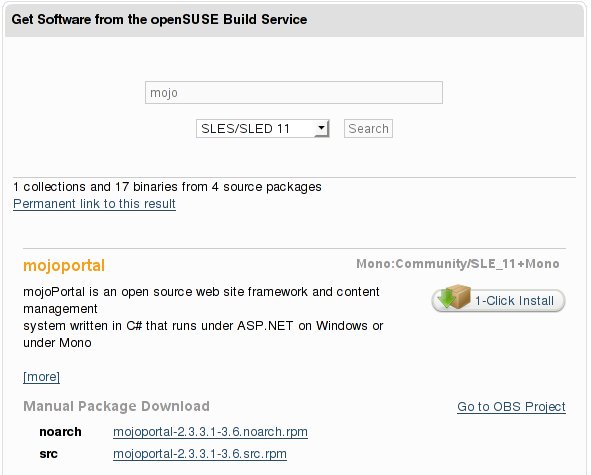
2) Download MojoPortal already packaged as an RPM from openSUSE.org. At the time of this entry, I downloaded and used mojoportal-2.3.3.1-3.6.noarch.rpm (12Mb) from this LINK. If link does not work, surf to http://software.opensuse.org/search and search for "mojo" with SLES/SLED 11 selected in the listbox.
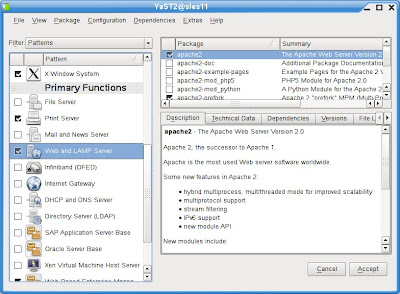
3) Install (if not already) Apache2 web server via YaST -> Software -> Software Management.
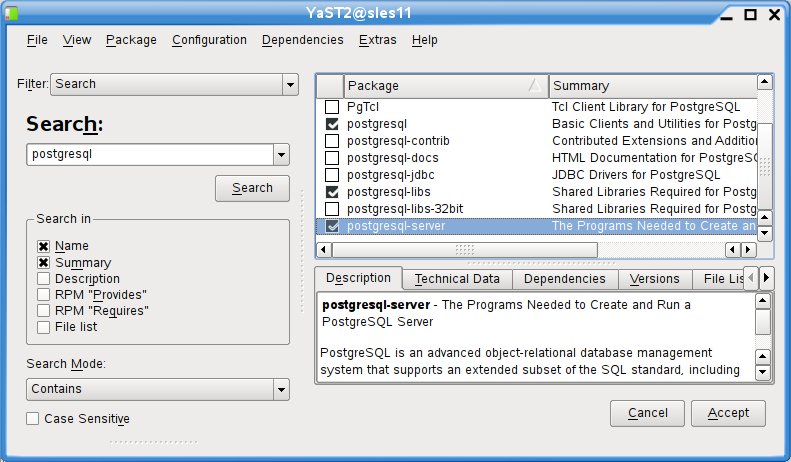
4) Install PostgresQL database via YaST -> Software -> Software Management.
5) Install Mono Extension/runtime on top of SLES 11. Use YaST -> Software -> Add-On Products or < yast2 add-on > to install the Mono Extension, ISO you downloaded in step (1).
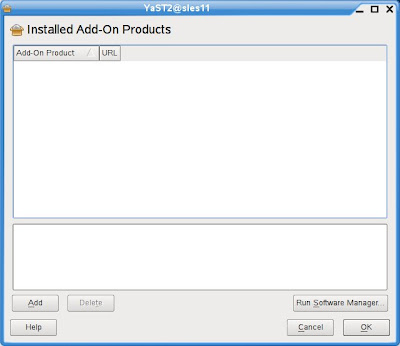
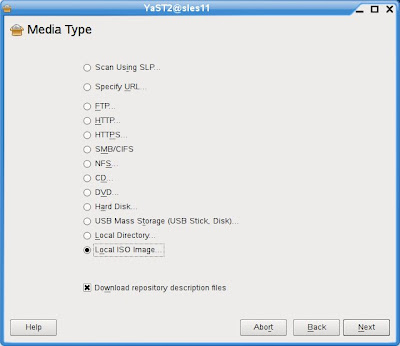
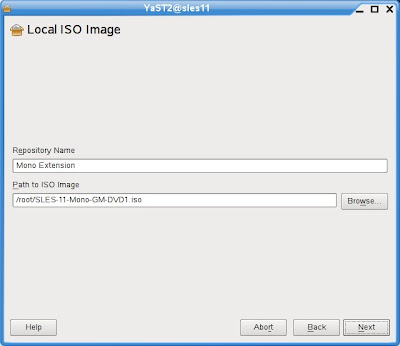
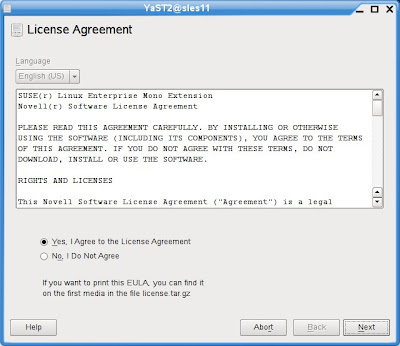
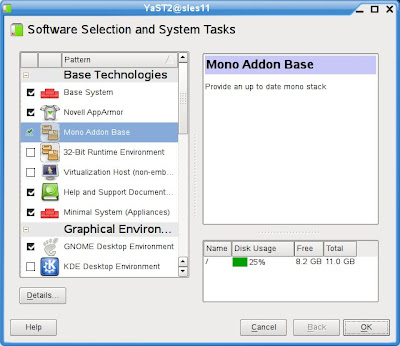
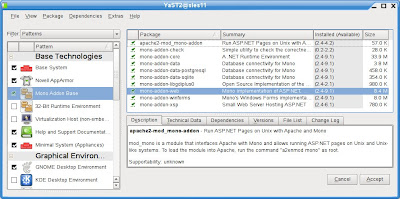
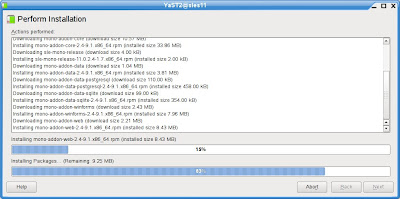
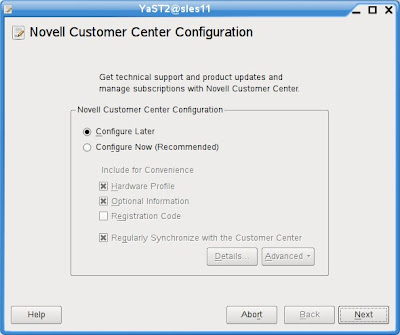
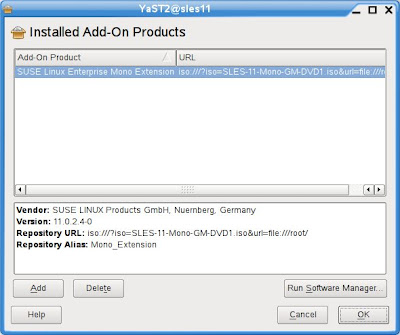
6) Install MojoPortal web application downloaded in step (2) with the following command executed as root: < rpm -ivh --nodeps mojoportal-2.3.3.1-3.4.noarch.rpm >. The nodeps flag is required as the mojoportal RPM is still looking for the older version 2.0 of Mono. The official SLE 11 Mono Extension is at version 2.4.
7) Ensure PostgreSQL server is running < rcpostgresql start >, and proceed to configure PostgreSQL database for MojoPortal: < /usr/share/mono/asp.net/data/mojoportal-2.3.3.1/init >
8) Configure Apache2 web server for MojoPortal: < cp /usr/share/mono/asp.net/conf/mojoportal-2.3.3.1/mojoportal.conf /etc/apache2/conf.d/ > and edit the mojoportal.conf file in the /etc/apache2/conf.d/ directory < gedit /etc/apache2/conf.d/mojoportal.conf >, put a # in front of the line < MonoServerPath mojoportal "/usr/bin/mod-mono-server2" > and remove the # in the following line < #MonoServerPath mojoportal "/opt/novell/mono/bin/mod-mono-server2" >.
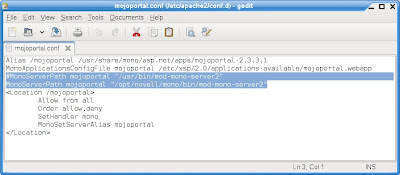
Restart Apache2 to have these configuration changes in effect < rcapache2 restart >.
9) Open a web browser and point to http://[hostname Or IP addr
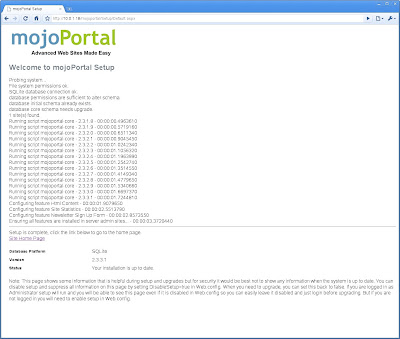
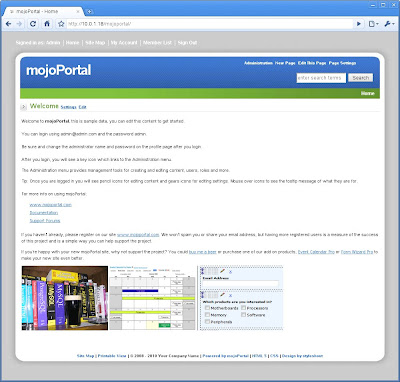
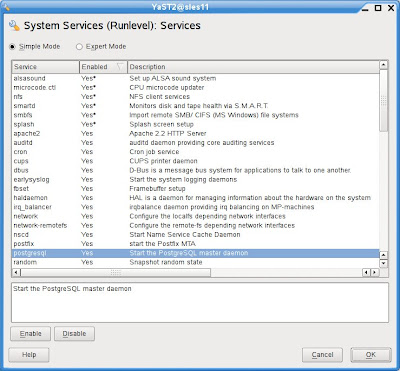
10) To ensure Apache2 web server and PostgreSQL database server is always auto-started on reboot, use YaST -> System -> System Services (Runlevel)
For more usage knowledge, please see MojoPortal.com for details at http://www.mojoportal.com/documentation.aspx
Go to http://software.opensuse.org/search and enter "mojoportal" in the text field and ensure you select SLES/SLED 11 in the drop-down box and click Search.
Cheers! 
* - With Mono, cross-platform is a truer statement now.
On the Windows platform, you would require IIS (web server) with ASP.NET 3.5 SP1 and a database (usually MS SQL Server). With SUSE Linux Enterprise Server 11 and the Mono Extension, we have Apache2 (web server) with Mono 2.4 runtime and PostgresQL database as the counterparts.
This blog entry will show you in rather painless fashion on how to install MojoPortal on SUSE Linux Enterprise Server 11 (with the Mono Extension) and start using it. To help with reading efficiency, I have 2 sections, the first section is the Expressed version where I assumed the reader is skilled and proficient with SUSE whereas the second is the Expanded version where it will include more details and screenshots. Finally, a little more info/detail, my setup has SLES 11 with Mono Extension virtualized on top of SLES 11 Xen hypervisor.
As a next step, I would consider leveraging SUSE Studio to build a small MojoPortal appliance (thus eliminating the need for this journal) and users can simply download the entire workload (OS, App & Data) without doing any "wiring". Tempting... stay tuned...
Pre-requisite: You already have a "vanilla" SLES 11 installed with basic network access and software repositories setup (ie DVD or online through NCC).
Expressed/Summarized (aka for SUSE admins) instructions:
1) Download SUSE Linux Enterprise Mono Extension from this LINK. You only require the SLES-11-Mono-GM-DVD1.iso (140Mb). The other ISO (162Mb) is meant for the older SLES 10 SP2.
2) Download MojoPortal already packaged as an RPM from openSUSE.org. At the time of this entry, I downloaded and used mojoportal-2.3.3.1-3.6.noarch.rpm (12Mb) from this LINK. If link does not work, surf to http://software.opensuse.org/search and search for "mojo" with SLES/SLED 11 selected in the listbox.
3) Install (if not already) Apache2 web server: < zypper in apache2 >
4) Install PostgresQL database: < zypper in postgresql-server >
5) Install Mono Extension/runtime on top of SLES 11. Use YaST -> Software -> Add-On Products or < yast2 add-on > to install the Mono Extension, ISO you downloaded in step (1).
6) Install MojoPortal web application: < rpm -ivh --nodeps mojoportal-2.3.3.1-3.4.noarch.rpm >. The nodeps flag is required as the mojoportal RPM is still looking for the older version 2.0 of Mono. The official SLE 11 Mono Extension is at version 2.4.
7) Ensure PostgreSQL server is running < rcpostgresql start >, and proceed to configure PostgreSQL database for MojoPortal: < /usr/share/mono/asp.net/data/mojoportal-2.3.3.1/init >
8) Configure Apache2 web server for MojoPortal: < cp /usr/share/mono/asp.net/conf/mojoportal-2.3.3.1/mojoportal.conf /etc/apache2/conf.d/ > and edit the mojoportal.conf file in the /etc/apache2/conf.d/ directory < vi /etc/apache2/conf.d/mojoportal.conf >, put a # in front of the line < MonoServerPath mojoportal "/usr/bin/mod-mono-server2" > and remove the # in the following line < #MonoServerPath mojoportal "/opt/novell/mono/bin/mod-mono-server2" >. Restart Apache2 to have these configuration changes in effect < rcapache2 restart >.
9) Open a web browser and point to http://[hostname Or IP addr
10) To ensure Apache2 web server and PostgreSQL database server is always auto-started on reboot: < chkconfig -s apache2 on > and < chkconfig -s postgresql on >
For more usage knowledge, please see MojoPortal.com for details at http://www.mojoportal.com/documentation.aspx

Expanded/Detailed (aka for those new to SUSE) instructions:
2) Download MojoPortal already packaged as an RPM from openSUSE.org. At the time of this entry, I downloaded and used mojoportal-2.3.3.1-3.6.noarch.rpm (12Mb) from this LINK. If link does not work, surf to http://software.opensuse.org/search and search for "mojo" with SLES/SLED 11 selected in the listbox.

3) Install (if not already) Apache2 web server via YaST -> Software -> Software Management.

4) Install PostgresQL database via YaST -> Software -> Software Management.

5) Install Mono Extension/runtime on top of SLES 11. Use YaST -> Software -> Add-On Products or < yast2 add-on > to install the Mono Extension, ISO you downloaded in step (1).


6) Install MojoPortal web application downloaded in step (2) with the following command executed as root: < rpm -ivh --nodeps mojoportal-2.3.3.1-3.4.noarch.rpm >. The nodeps flag is required as the mojoportal RPM is still looking for the older version 2.0 of Mono. The official SLE 11 Mono Extension is at version 2.4.
7) Ensure PostgreSQL server is running < rcpostgresql start >, and proceed to configure PostgreSQL database for MojoPortal: < /usr/share/mono/asp.net/data/mojoportal-2.3.3.1/init >
8) Configure Apache2 web server for MojoPortal: < cp /usr/share/mono/asp.net/conf/mojoportal-2.3.3.1/mojoportal.conf /etc/apache2/conf.d/ > and edit the mojoportal.conf file in the /etc/apache2/conf.d/ directory < gedit /etc/apache2/conf.d/mojoportal.conf >, put a # in front of the line < MonoServerPath mojoportal "/usr/bin/mod-mono-server2" > and remove the # in the following line < #MonoServerPath mojoportal "/opt/novell/mono/bin/mod-mono-server2" >.

Restart Apache2 to have these configuration changes in effect < rcapache2 restart >.
9) Open a web browser and point to http://[hostname Or IP addr


10) To ensure Apache2 web server and PostgreSQL database server is always auto-started on reboot, use YaST -> System -> System Services (Runlevel)

For more usage knowledge, please see MojoPortal.com for details at http://www.mojoportal.com/documentation.aspx
Cheers!
Wednesday, May 6, 2009
Running .NET on Apache2 with Mono on SLES 11
This is a journal on how I setup SLES 11 with Xen and the Mono Extension to demonstrate the capabilities of SLES 11 in hosting .NET applications on Apache2, all on a single machine.
1. Installed SLES 11 on my Lenovo Thinkpad T61p.
2. Install the SLES 11 Xen hypervisor. YaST -> Virtualization -> Install Hypervisor and Tools. Reboot the machine into the SLES 11 Xen-kernel. Configure a local network bridge so that virtual machines and the host can communicate via TCP/IP. For details, see my other entry at http://sellingfreesoftwareforaliving.blogspot.com/2008/06/simple-nat-with-xen-setup.html
3. Create and install SLES 11 as a new virtual machine (domU) called WebSrv. Install the Apache2 web server (installation pattern: Web and LAMP Server) and the Mono extension (post-installation).
The Mono extension can be downloaded from http://download.novell.com, select SUSE Linux Enterprise Mono Extension and click Search. Alternatively, the direct link (at the time of this writing) is HERE. Installation of the Mono is fairly straight forward YaST -> Software -> Add-On Products and select the ISO file that has been downloaded.
4. Create and install a Windows virtual machine (domU) called WinDev. I have used Windows Server 2003 and Windows Vista. You can also use Windows XP... as long as its a platform where we can install Visual Studio 2008 Standard Edition. See this link for installation requirements HERE.
5. Download and install Visual Studio 2008 Standard Edition onto the Windows virtual machine (WinDev) created previously. Visual Studio 2008 can be downloaded as a trial (90 days) HERE ... even better if you have an MSDN subscription and you can use this without worrying about expiration of your trial licence.
6. Download the freely available .NET ASPX web application called BlogEngine.NET (source) from http://www.dotnetblogengine.net/ into the Windows virtual machine. Latest version (at time of this entry) is V1.5. Optionally, you might want to refer to their online video on how to download and install this on Visual Studio HERE.
7. Start Visual Studio 2008 and import the BlogEngine.NET application (source). From the Solution Explorer, collapse the tree and right-click on the BlogEngine.Web folder and select Set as Startup Project.
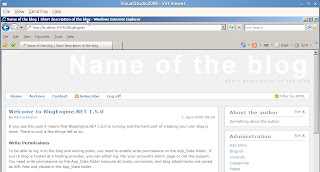
8. Test that the BlogEngine.NET application works by hitting Ctrl-F5 or Menu Bar -> Debug -> Start without Debugging. If successful, the IE browser will launch and you will see the start page for the BlogEngine webapp. Close IE to end the debugging session within Visual Studio 2008.
9. On the SLES 11 virtual machine (WebSrv), create a sub-directory called BlogEngine in /srv/www/htdocs/ and share this directory via SAMBA (with read and write access), YaST -> Network Services -> Samba Server.
10. On the Windows virtual machine (WinDev), map the shared directory from SLES 11 (WebSrv) as Z: drive.
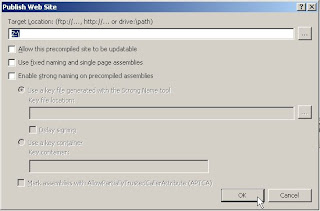
11. Export the BlogEngine.NET application to Z: drive via Menu Bar -> Build -> Publish Website. See screenshot below. The initial publishing will take some time as compilation is required.
13. Point your IE browser to http://[WebSrv]/BlogEngine , where [WebSrv] is the IP address or resolvable hostname of the SLES 11 virtual machine, and verify that the .NET ASPX application works!
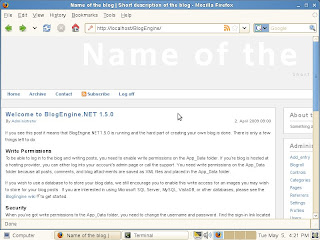
If so, go to SLES 11 (WebSrv) and open a Firefox browser to http://localhost/BlogEngine and verify the .NET ASPX web application loads.
DONE!
1. Installed SLES 11 on my Lenovo Thinkpad T61p.
2. Install the SLES 11 Xen hypervisor. YaST -> Virtualization -> Install Hypervisor and Tools. Reboot the machine into the SLES 11 Xen-kernel. Configure a local network bridge so that virtual machines and the host can communicate via TCP/IP. For details, see my other entry at http://sellingfreesoftwareforaliving.blogspot.com/2008/06/simple-nat-with-xen-setup.html
3. Create and install SLES 11 as a new virtual machine (domU) called WebSrv. Install the Apache2 web server (installation pattern: Web and LAMP Server) and the Mono extension (post-installation).
The Mono extension can be downloaded from http://download.novell.com, select SUSE Linux Enterprise Mono Extension and click Search. Alternatively, the direct link (at the time of this writing) is HERE. Installation of the Mono is fairly straight forward YaST -> Software -> Add-On Products and select the ISO file that has been downloaded.
4. Create and install a Windows virtual machine (domU) called WinDev. I have used Windows Server 2003 and Windows Vista. You can also use Windows XP... as long as its a platform where we can install Visual Studio 2008 Standard Edition. See this link for installation requirements HERE.
5. Download and install Visual Studio 2008 Standard Edition onto the Windows virtual machine (WinDev) created previously. Visual Studio 2008 can be downloaded as a trial (90 days) HERE ... even better if you have an MSDN subscription and you can use this without worrying about expiration of your trial licence.
6. Download the freely available .NET ASPX web application called BlogEngine.NET (source) from http://www.dotnetblogengine.net/ into the Windows virtual machine. Latest version (at time of this entry) is V1.5. Optionally, you might want to refer to their online video on how to download and install this on Visual Studio HERE.
7. Start Visual Studio 2008 and import the BlogEngine.NET application (source). From the Solution Explorer, collapse the tree and right-click on the BlogEngine.Web folder and select Set as Startup Project.
8. Test that the BlogEngine.NET application works by hitting Ctrl-F5 or Menu Bar -> Debug -> Start without Debugging. If successful, the IE browser will launch and you will see the start page for the BlogEngine webapp. Close IE to end the debugging session within Visual Studio 2008.

9. On the SLES 11 virtual machine (WebSrv), create a sub-directory called BlogEngine in /srv/www/htdocs/ and share this directory via SAMBA (with read and write access), YaST -> Network Services -> Samba Server.
10. On the Windows virtual machine (WinDev), map the shared directory from SLES 11 (WebSrv) as Z: drive.
11. Export the BlogEngine.NET application to Z: drive via Menu Bar -> Build -> Publish Website. See screenshot below. The initial publishing will take some time as compilation is required.

13. Point your IE browser to http://[WebSrv]/BlogEngine , where [WebSrv] is the IP address or resolvable hostname of the SLES 11 virtual machine, and verify that the .NET ASPX application works!
If so, go to SLES 11 (WebSrv) and open a Firefox browser to http://localhost/BlogEngine and verify the .NET ASPX web application loads.

DONE!
Wednesday, February 18, 2009
OSSPAC 2009
I was at the Open Source Singapore Pacific-Asia Conference (OSSPAC) and had the privilege to share the Novell SUSE story at their keynote event yesterday (17th Feb 2009).
In the afternoon, while walking through the various vendor and partner exhibits, I came across these two fellas and just had to take a picture with them... from left to right: The Duke, MySQL Dolphin and me with SUSE Geeko in tow.

SUSE Linux Enterprise with JAVA and MySQL ... nice
Oh, and here are a short snippet on the contents of my keynote:
In the afternoon, while walking through the various vendor and partner exhibits, I came across these two fellas and just had to take a picture with them...
from left to right: The Duke, MySQL Dolphin and me with SUSE Geeko in tow.
SUSE Linux Enterprise with JAVA and MySQL ... nice
Oh, and here are a short snippet on the contents of my keynote:
- The Novell SUSE history and how SUSE is gaining more than 5000 new customers for Novell in 2007 alone... and growing revenue at 38% from 2006 to 2007 and from 2007 to 2008. We are growing SUSE at a higher rate than the Linux market at 22% year on year
- All these are possible with the strong support from Novell partner ecosystem and it includes our strategic relationships with IBM, Microsoft, Dell, HP, Lenovo, Intel and AMD
- SUSE is important but not the only open source story at Novell. I picked Mono/Moonlight and SUSE Studio as some of the projects that Novell is investing in and hoping to yield fruits down the line
- Mono success at Unity3D and FusionFall MMORPG (other success stories)
- Moonlight bringing equality to Firefox users for President Obama's inauguration
- SUSE Studio and how partners can create custom Linux application appliances in multiple format (disk image, VMware and Xen)... and its still in Alpha!
Subscribe to:
Posts (Atom)