Traveling to China for a business trip this week, I found myself caught up between the tug-o-war between China and Google, with China being displeased with the little effort Google makes to filter out porn via certain search words on their site. It also made me realized my dependency for Google services... time for a re-think.
Anyway, I was happily reading my feeds via iGoogle, checking my emails on Gmail and doing lots of searches on Google on Wednesday afternoon (24th June 2009). Things weren't so rosy after dinner as I found that my browser keeps getting connection resent errors to anything related to Google (google.com, blogspot.com and youtube.com).
This went on till Friday morning (26th June 2009) when Google.com services were resumed. However, I still could not get onto Blogspot or YouTube. Even now, as I'm sitting in my hotel lobby waiting for my transportation to the international airport, I still do not have access to Blogspot or YouTube. Not that it matters too much since I'm heading home to Singapore in another few hours.
Astute readers will wonder how did I manage to post this entry on my blog while still behind the Great Firewall of China? Its not the most efficient way (from networking and data perspective) but I managed to gain remote-desktop access to my SUSE Linux Enterprise Desktop 11 running on my home PC in Singapore. Here's a link to my previous posts (2008) on the various options for remote desktop access to SLED [Part1 and Part2].
Saturday, June 27, 2009

Wednesday, May 20, 2009
The One Talent Manager
Once upon a time, in a land far away, there lived a rich man who had to leave the country on a long journey. Before he left, he summoned his top 3 managers and entrusted them with funds to manage on his behalf.
In accordance to their ability, the rich man gave the first manager 5 Talents. Coincidentally, Talents is the measure of currency in this country and its estimated to be approximately USD$1,000 per Talent. He gave 2 Talents to the second manager and finally, to the third manager, he gave 1 Talent.
The first manager put his 5 Talents to work, through shrewd investments, and gained 5 more. The second manager also put his 2 Talents to work, in various financial instruments, and gained 2 more Talents.
The third manager, the One Talent Manager, decided that it was too risky and took a more conservative approach... especially in times of economic uncertainties, high unemployment and negative market sentiments etc. To safe guard against these dark and trying times, he converted his 1 Talent into gold bars. He then dug a big hole in his backyard and buried the gold bars. He would spend an hour every evening standing in his backyard feeling secure that his employer's fortunes are safe under his care.
Soon, the rich man returned from his journey and summoned his 3 managers to give an account of their activities. The first manager reported that he has generated another 5 Talents from his initial capital and has a total of 10 Talents. The rich man was pleased and gave him 10 more Talents to manage.
The second manager reports that he too has a 100% increase from his initial 2 Talents. The rich man was pleased and gave 4 more Talents for him to manage.
Finally, the third manager (the One Talent Manager), presented 1 Talent worth of gold bars to his employer. He justified his conservative approach to fund management by citing economic uncertainties, fluctuating rates and negative market sentiments. He felt he has not put his employer's fortunes at risk and proudly returns what was given to him.
The rich man took the 1 Talent worth of gold bars and gave it to the first manager and fired the third manager. "The least you could have done is to put this 1 Talent in a bank and earn interest on it. You are lazy and fearful of many things." said the rich man.
The above story is my adaptation... the original story has been handed down many generations for over 2,000 years and can be found here - [Link]
Here are my thoughts on the story of the One Talent Manager:
I do not want to be a One Talent Manager.
In accordance to their ability, the rich man gave the first manager 5 Talents. Coincidentally, Talents is the measure of currency in this country and its estimated to be approximately USD$1,000 per Talent. He gave 2 Talents to the second manager and finally, to the third manager, he gave 1 Talent.
The first manager put his 5 Talents to work, through shrewd investments, and gained 5 more. The second manager also put his 2 Talents to work, in various financial instruments, and gained 2 more Talents.
The third manager, the One Talent Manager, decided that it was too risky and took a more conservative approach... especially in times of economic uncertainties, high unemployment and negative market sentiments etc. To safe guard against these dark and trying times, he converted his 1 Talent into gold bars. He then dug a big hole in his backyard and buried the gold bars. He would spend an hour every evening standing in his backyard feeling secure that his employer's fortunes are safe under his care.
Soon, the rich man returned from his journey and summoned his 3 managers to give an account of their activities. The first manager reported that he has generated another 5 Talents from his initial capital and has a total of 10 Talents. The rich man was pleased and gave him 10 more Talents to manage.
The second manager reports that he too has a 100% increase from his initial 2 Talents. The rich man was pleased and gave 4 more Talents for him to manage.
Finally, the third manager (the One Talent Manager), presented 1 Talent worth of gold bars to his employer. He justified his conservative approach to fund management by citing economic uncertainties, fluctuating rates and negative market sentiments. He felt he has not put his employer's fortunes at risk and proudly returns what was given to him.
The rich man took the 1 Talent worth of gold bars and gave it to the first manager and fired the third manager. "The least you could have done is to put this 1 Talent in a bank and earn interest on it. You are lazy and fearful of many things." said the rich man.
The above story is my adaptation... the original story has been handed down many generations for over 2,000 years and can be found here - [Link]
Here are my thoughts on the story of the One Talent Manager:
- In any time and in any circumstance, inaction through fear is the wrong action to take. Conversely, many actions through a lack of knowledge and wisdom is just a busy schedule with little results... that is another story for another time...
- If you have an ability, use it and see it grow and increase as you participate and contribute with like-minded individuals. If you choose to withhold, you will loose that ability through inaction.
- There are many who prefer to hold on to what they have and what had worked for them... its only human to crave safety... however, have we considered the cost of denying new (OSS) trends and opportunities and vehemently and emotionally hold onto the past?
I do not want to be a One Talent Manager.
Friday, May 8, 2009
Windows 7 RC virtualized on Xen
Yep, downloaded a copy of Windows 7 RC and a corresponding product key. Installed and now fully virtualized under SLES 11 Xen... no hacks, no tricks, it just worked... the way I like it. Yeah!

The installation experience for Windows 7 RC is smooth and painless coz it made all my choices for me... how sweet?! All I had to do was to tell it to do a fresh install and choose the target disk!
  Of course, post-installation requires me to create a user account and password followed by activating the product with the product key. No fuss, no stress installation for an end user desktop.
The installation experience for SUSE Linux Enterprise Desktop 11 is pretty close too in terms of ease and yet gives me more options at install time to configure the system the way I want it... I welcome the arrival of Windows 7, as iron sharpens iron, it just gets better (progress) as opposed to a monopoly and innovation suffers.

The installation experience for Windows 7 RC is smooth and painless coz it made all my choices for me... how sweet?!
All I had to do was to tell it to do a fresh install and choose the target disk! Of course, post-installation requires me to create a user account and password followed by activating the product with the product key. No fuss, no stress installation for an end user desktop.The installation experience for SUSE Linux Enterprise Desktop 11 is pretty close too in terms of ease and yet gives me more options at install time to configure the system the way I want it... I welcome the arrival of Windows 7, as iron sharpens iron, it just gets better (progress) as opposed to a monopoly and innovation suffers.
Wednesday, May 6, 2009
Running .NET on Apache2 with Mono on SLES 11
This is a journal on how I setup SLES 11 with Xen and the Mono Extension to demonstrate the capabilities of SLES 11 in hosting .NET applications on Apache2, all on a single machine.
1. Installed SLES 11 on my Lenovo Thinkpad T61p.
2. Install the SLES 11 Xen hypervisor. YaST -> Virtualization -> Install Hypervisor and Tools. Reboot the machine into the SLES 11 Xen-kernel. Configure a local network bridge so that virtual machines and the host can communicate via TCP/IP. For details, see my other entry at http://sellingfreesoftwareforaliving.blogspot.com/2008/06/simple-nat-with-xen-setup.html
3. Create and install SLES 11 as a new virtual machine (domU) called WebSrv. Install the Apache2 web server (installation pattern: Web and LAMP Server) and the Mono extension (post-installation).
The Mono extension can be downloaded from http://download.novell.com, select SUSE Linux Enterprise Mono Extension and click Search. Alternatively, the direct link (at the time of this writing) is HERE. Installation of the Mono is fairly straight forward YaST -> Software -> Add-On Products and select the ISO file that has been downloaded.
4. Create and install a Windows virtual machine (domU) called WinDev. I have used Windows Server 2003 and Windows Vista. You can also use Windows XP... as long as its a platform where we can install Visual Studio 2008 Standard Edition. See this link for installation requirements HERE.
5. Download and install Visual Studio 2008 Standard Edition onto the Windows virtual machine (WinDev) created previously. Visual Studio 2008 can be downloaded as a trial (90 days) HERE ... even better if you have an MSDN subscription and you can use this without worrying about expiration of your trial licence.
6. Download the freely available .NET ASPX web application called BlogEngine.NET (source) from http://www.dotnetblogengine.net/ into the Windows virtual machine. Latest version (at time of this entry) is V1.5. Optionally, you might want to refer to their online video on how to download and install this on Visual Studio HERE.
7. Start Visual Studio 2008 and import the BlogEngine.NET application (source). From the Solution Explorer, collapse the tree and right-click on the BlogEngine.Web folder and select Set as Startup Project.
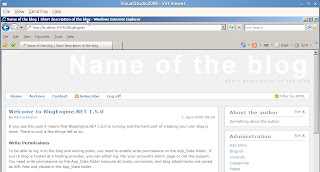
8. Test that the BlogEngine.NET application works by hitting Ctrl-F5 or Menu Bar -> Debug -> Start without Debugging. If successful, the IE browser will launch and you will see the start page for the BlogEngine webapp. Close IE to end the debugging session within Visual Studio 2008.
9. On the SLES 11 virtual machine (WebSrv), create a sub-directory called BlogEngine in /srv/www/htdocs/ and share this directory via SAMBA (with read and write access), YaST -> Network Services -> Samba Server.
10. On the Windows virtual machine (WinDev), map the shared directory from SLES 11 (WebSrv) as Z: drive.
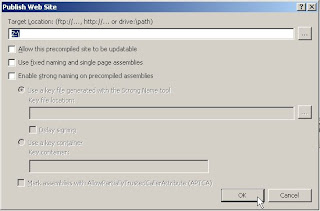
11. Export the BlogEngine.NET application to Z: drive via Menu Bar -> Build -> Publish Website. See screenshot below. The initial publishing will take some time as compilation is required.
13. Point your IE browser to http://[WebSrv]/BlogEngine , where [WebSrv] is the IP address or resolvable hostname of the SLES 11 virtual machine, and verify that the .NET ASPX application works!
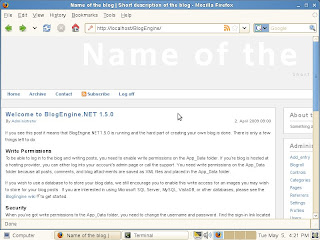
If so, go to SLES 11 (WebSrv) and open a Firefox browser to http://localhost/BlogEngine and verify the .NET ASPX web application loads.
DONE!
1. Installed SLES 11 on my Lenovo Thinkpad T61p.
2. Install the SLES 11 Xen hypervisor. YaST -> Virtualization -> Install Hypervisor and Tools. Reboot the machine into the SLES 11 Xen-kernel. Configure a local network bridge so that virtual machines and the host can communicate via TCP/IP. For details, see my other entry at http://sellingfreesoftwareforaliving.blogspot.com/2008/06/simple-nat-with-xen-setup.html
3. Create and install SLES 11 as a new virtual machine (domU) called WebSrv. Install the Apache2 web server (installation pattern: Web and LAMP Server) and the Mono extension (post-installation).
The Mono extension can be downloaded from http://download.novell.com, select SUSE Linux Enterprise Mono Extension and click Search. Alternatively, the direct link (at the time of this writing) is HERE. Installation of the Mono is fairly straight forward YaST -> Software -> Add-On Products and select the ISO file that has been downloaded.
4. Create and install a Windows virtual machine (domU) called WinDev. I have used Windows Server 2003 and Windows Vista. You can also use Windows XP... as long as its a platform where we can install Visual Studio 2008 Standard Edition. See this link for installation requirements HERE.
5. Download and install Visual Studio 2008 Standard Edition onto the Windows virtual machine (WinDev) created previously. Visual Studio 2008 can be downloaded as a trial (90 days) HERE ... even better if you have an MSDN subscription and you can use this without worrying about expiration of your trial licence.
6. Download the freely available .NET ASPX web application called BlogEngine.NET (source) from http://www.dotnetblogengine.net/ into the Windows virtual machine. Latest version (at time of this entry) is V1.5. Optionally, you might want to refer to their online video on how to download and install this on Visual Studio HERE.
7. Start Visual Studio 2008 and import the BlogEngine.NET application (source). From the Solution Explorer, collapse the tree and right-click on the BlogEngine.Web folder and select Set as Startup Project.
8. Test that the BlogEngine.NET application works by hitting Ctrl-F5 or Menu Bar -> Debug -> Start without Debugging. If successful, the IE browser will launch and you will see the start page for the BlogEngine webapp. Close IE to end the debugging session within Visual Studio 2008.

9. On the SLES 11 virtual machine (WebSrv), create a sub-directory called BlogEngine in /srv/www/htdocs/ and share this directory via SAMBA (with read and write access), YaST -> Network Services -> Samba Server.
10. On the Windows virtual machine (WinDev), map the shared directory from SLES 11 (WebSrv) as Z: drive.
11. Export the BlogEngine.NET application to Z: drive via Menu Bar -> Build -> Publish Website. See screenshot below. The initial publishing will take some time as compilation is required.

13. Point your IE browser to http://[WebSrv]/BlogEngine , where [WebSrv] is the IP address or resolvable hostname of the SLES 11 virtual machine, and verify that the .NET ASPX application works!
If so, go to SLES 11 (WebSrv) and open a Firefox browser to http://localhost/BlogEngine and verify the .NET ASPX web application loads.

DONE!
Subscribe to:
Posts (Atom)