Thursday, May 27, 2010

KVM in SUSE Linux Enterprise Server 11 SP 1

At Novell BrainShare Amsterdam last week, the Geekos were handing out SUSE Linux Enterprise Server 11 SP1 (RC4) at IT Central. So off came my DVD drive and I installed it on a separate partition on my Thinkpad.

Since its a Release Candidate (RC4) and not the final GA version due on 2nd June, I wanted to have a quick look at how KVM works since its an officially supported hypervisor in SP1 (other than the very established Xen shipped and supported since SLES 10 back in 2006).

I've been using Xen and helping partners & customers implement it for a few years, without any knowledge of KVM, I wanted to dive right in and see how far I'd go. I am very impressed with the engineering and thought put into how KVM is packaged with SLES 11 SP1. This is truly a fine example of an "Enterprise" grade product. I was able to virtualize an instance of SLES 11 SP1 and MS Windows 7 with no assistance. The KEY is the tools (libvirt & virt-manager) for Xen, which I'm familiar since SLES 10, is now capable of managing both Xen and KVM in SLES 11 SP1. Depending if you boot into the Xen kernel or the default kernel with KVM module loaded, these same tools can be used, thus providing a consistent user interface. This is just brilliant! senyum

For existing users of Xen, should they decide that KVM is a better alternative as it matures further down the road, they could easily switch without much hassle. More importantly, its conceivable that any custom scripts (automation, failover or whatever) developed for Xen can be easily applied to KVM. This is much better than RIP-n-REPLACE in so many other "Enterprise" grade products.

Here are a few screenshots:


Cheers! senyum

Sunday, May 16, 2010

Why is SUSE Studio so Addictive?

Simply put, its all about creativity and productivity. If you have never heard of SUSE Studio, please go and check it out at http://susestudio.com... and while you wait for your account creation to complete, check out the screencast and read the many credible IT information sources that have reported/blogged about it (via Google).

However, you will never truly appreciate it until you log in and try to create your first software appliance. As a famous chain of Indian restaurants here in Singapore says: "The proof is in the eating..." senyum

This is my personal take on why I keep going back to SUSE Studio and leveraging its many features. A portion of time spent in my work goes into the creation and setting up of relevant product demos. This is both a repetitive and iterative process. Repetitive because I have to go and show this to multiple business partners and customers. Iterative because with each demonstration, with constructive feedback from my audience, I will enhance the demo (customization). Further, I have regional responsibilities across a few countries (across 5 timezones and many more languages).

Before SUSE Studio, we have tried a few strategies to varying degrees of success:
1. We could create a document that describes how to setup and showcase the demo, emailed it to all the local engineers to replicate.
2. Alternatively, if time is short, we create demos on hard disks and shipped them out.
3. We also tried creating demos in a virtual machine and either ship it or host it on an FTP site for download.

With method (1), there is a lot of duplication of work as each engineer in every country will spend time setting up the demo which consists of hardware, operating system, application and sample data. With method (2), it is slightly more productive because we create the demo once and clone it across 5-10 hard disks and ship them out. However, it is not cost-effective due to the need to purchase hard disk and courier charges... for the next iterative demo, we need the field engineers to ship the hard disk back for updates, and then shipping them off again...

With virtualization as described in method (3), we are able to create portable demos across a variety of hardware (laptop to servers). We overcome the time consuming & duplication of work in (1) and the resource & shipping costs in (2). The only challenge is the network download bandwidth available in different countries.

SUSE Studio is the next step in productivity in this direction, here are the key advantages:
a) We create/design the demo workload (software appliance) within a web browser! There are a decent amount of templates, online repositories with latest versions of software and Web 2.0 wizards that progressively advises you on software version compatibility and related hints.

b) We can simultaneously target different output formats (ie VMware, VirtualBox, Xen, Disk Image/USB key and live CD/DVD iso), all generated online on someone else's infrastructure. sengihnampakgigi

c) We can "testdrive" the generated demo online via a web browser and eliminate the need to download the images until we are happy with our creation.

d) We can share these demos (software appliance) to a wider audience*

I do not need the constant availability of powerful machines with virtualization capabilities and loads of hard disk space for creating many different demos with even more snapshots. As long as I got a web browser and Internet access, I can use SUSE Studio to create new demos or improve on existing ones. Once I reach a milestone in my demo, I version it and make the link to download the image available to our engineers.

For (d), while not officially available at this time, I am fortunate to be eligible to beta-test the "marketplace" feature where you can share your appliance to all members (beta testers) of SUSE Studio. I can browse or search for software appliances, try them out, clone their configuration as a base template for additional work/customizations, rate them (5 star system) etc.

All these little things add up in improving productivity and giving me more time to engage my brain for creativity in designing the next iteration or new demo.

That is why SUSE Studio is so Addictive for me. peace

PS: For ISVs who signed up with Novell for the SUSE Appliance Toolkit, you get to deploy an enhanced SUSE Studio onsite, thus having a software appliance workbench service in your private network, I mean, Cloud. encem

Friday, April 9, 2010

SUSE Engineering Quality: ASP.NET on IBM Mainframe

I experienced, first-hand, the Outstanding quality of SUSE Engineering today. Common Code-base has always been touted as a key differentiator with SUSE Linux Enterprise, where the same operating system is compiled (AutoBuild) and ready for a number of different hardware chipsets/platforms. The implication is that the latest & greatest code/patches will be simultaneously available for SUSE Linux Enterprise on x86 (32 & 64 bit) as well as IBM POWER, IBM System z etc.

With IBM System z (aka the Mainframe), its been said that SUSE Linux Enterprise runs natively & without any emulation layer. Further, there is approximately 1% of code change in the kernel due to the fact that the System z uses a different chipset.

All the above is true and I am personally convinced today. Why? Because I had the opportunity to work on a small virtual instance (512Mb RAM) of SUSE Linux Enterprise Server 11 (SLES 11) running on the legendary IBM System z10 BC this week. The machine is also hosting a number of other SLES 11 instances and traditional mainframe workloads (ie z/OS).

Previously, I wrote an entry on setting up mojoPortal (ASP.NET web app) on SUSE Linux Enterprise with the Mono extension (link). Using the exact same steps that I described, written & tested against my Lenovo Thinkpad (x86), I can achieve the same result on the IBM System z10 BC! encem

That's right folks, the only difference is I needed to install SLES 11 DVD for System z (s390x). Next, I used the exact same mojoportal rpm (noarch) & SLES-11-Mono-GM-DVD1.iso (noticed its hardware platform independent) that worked on my Lenovo Thinkpad. In less than an hour (the speed and throughput of System z is amazing), I've got everything up and running on SLES 11 on System z.

Interesting how we now have the option of running traditional LAMP stacks, Java workloads and .NET applications on SLES 11 on System z. Further, with database options of PostgreSQL, MySQL, IBM DB2, Oracle DB added to the mix... Wow, this opens up more options for server consolidation and the type of applications that can now be hosted on System z to achieve unrivaled uptime, vertical scalability, security and I/O throughput. sembah

Sweeeeeet!! senyum

Thursday, March 25, 2010

MojoPortal on SLES 11 with Mono Extension

MojoPortal (http://www.mojoportal.com) is an open source, cross-platform*, content management system (CMS) using ASP.NET as the web development language. Its intended for personal and commercial use and license under the Common Public License 1.0. You can read more on the motivations of the author here.

* - With Mono, cross-platform is a truer statement now. senyumkenyit

On the Windows platform, you would require IIS (web server) with ASP.NET 3.5 SP1 and a database (usually MS SQL Server). With SUSE Linux Enterprise Server 11 and the Mono Extension, we have Apache2 (web server) with Mono 2.4 runtime and PostgresQL database as the counterparts.

This blog entry will show you in rather painless fashion on how to install MojoPortal on SUSE Linux Enterprise Server 11 (with the Mono Extension) and start using it. To help with reading efficiency, I have 2 sections, the first section is the Expressed version where I assumed the reader is skilled and proficient with SUSE whereas the second is the Expanded version where it will include more details and screenshots. Finally, a little more info/detail, my setup has SLES 11 with Mono Extension virtualized on top of SLES 11 Xen hypervisor.

As a next step, I would consider leveraging SUSE Studio to build a small MojoPortal appliance (thus eliminating the need for this journal) and users can simply download the entire workload (OS, App & Data) without doing any "wiring". Tempting... stay tuned... senyum

Pre-requisite: You already have a "vanilla" SLES 11 installed with basic network access and software repositories setup (ie DVD or online through NCC).

Expressed/Summarized (aka for SUSE admins) instructions:

1) Download SUSE Linux Enterprise Mono Extension from this LINK. You only require the SLES-11-Mono-GM-DVD1.iso (140Mb). The other ISO (162Mb) is meant for the older SLES 10 SP2.

2) Download MojoPortal already packaged as an RPM from openSUSE.org. At the time of this entry, I downloaded and used mojoportal-2.3.3.1-3.6.noarch.rpm (12Mb) from this LINK. If link does not work, surf to http://software.opensuse.org/search and search for "mojo" with SLES/SLED 11 selected in the listbox.

3) Install (if not already) Apache2 web server: < zypper in apache2 >

4) Install PostgresQL database: < zypper in postgresql-server >

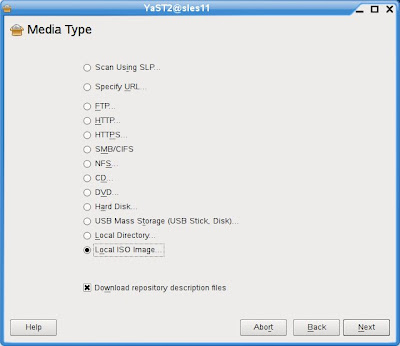
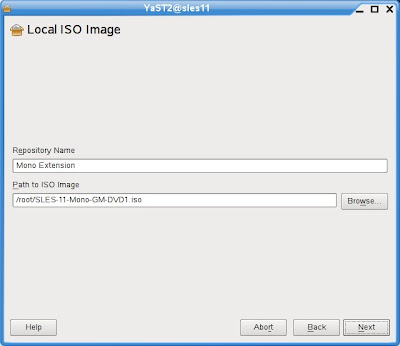
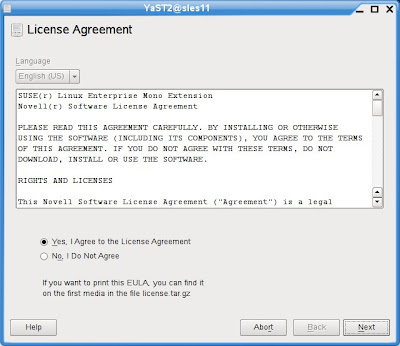
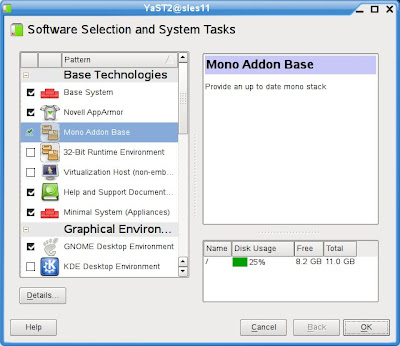
5) Install Mono Extension/runtime on top of SLES 11. Use YaST -> Software -> Add-On Products or < yast2 add-on > to install the Mono Extension, ISO you downloaded in step (1).

6) Install MojoPortal web application: < rpm -ivh --nodeps mojoportal-2.3.3.1-3.4.noarch.rpm >. The nodeps flag is required as the mojoportal RPM is still looking for the older version 2.0 of Mono. The official SLE 11 Mono Extension is at version 2.4.

7) Ensure PostgreSQL server is running < rcpostgresql start >, and proceed to configure PostgreSQL database for MojoPortal: < /usr/share/mono/asp.net/data/mojoportal-2.3.3.1/init >

8) Configure Apache2 web server for MojoPortal: < cp /usr/share/mono/asp.net/conf/mojoportal-2.3.3.1/mojoportal.conf /etc/apache2/conf.d/ > and edit the mojoportal.conf file in the /etc/apache2/conf.d/ directory < vi /etc/apache2/conf.d/mojoportal.conf >, put a # in front of the line < MonoServerPath mojoportal "/usr/bin/mod-mono-server2" > and remove the # in the following line < #MonoServerPath mojoportal "/opt/novell/mono/bin/mod-mono-server2" >. Restart Apache2 to have these configuration changes in effect < rcapache2 restart >.

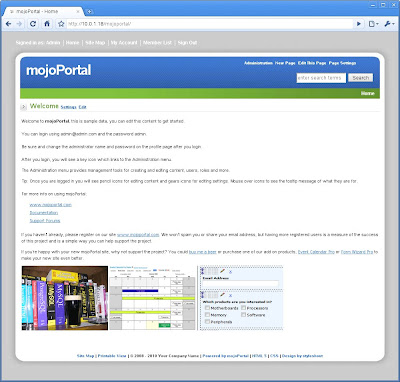
9) Open a web browser and point to http://[hostname Or IP addr]/mojoportal . The initial startup will take awhile as MojoPortal initializes for the first time. Login as MojoPortal Administrator with ID admin@admin.com and Password admin.

10) To ensure Apache2 web server and PostgreSQL database server is always auto-started on reboot: < chkconfig -s apache2 on > and < chkconfig -s postgresql on >

For more usage knowledge, please see MojoPortal.com for details at http://www.mojoportal.com/documentation.aspx
Link

Expanded/Detailed (aka for those new to SUSE) instructions:

1) Download SUSE Linux Enterprise Mono Extension from this LINK. You only require the SLES-11-Mono-GM-DVD1.iso (140Mb). The other ISO (162Mb) is meant for the older SLES 10 SP2.
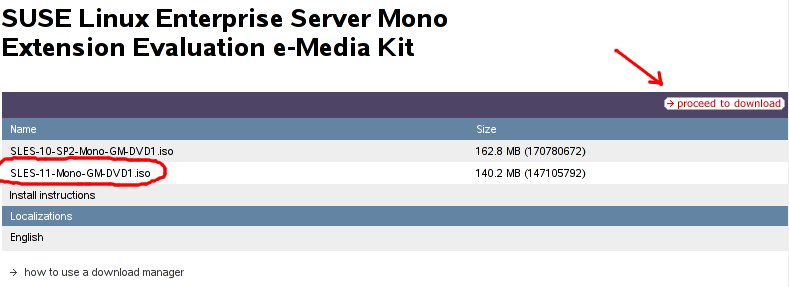

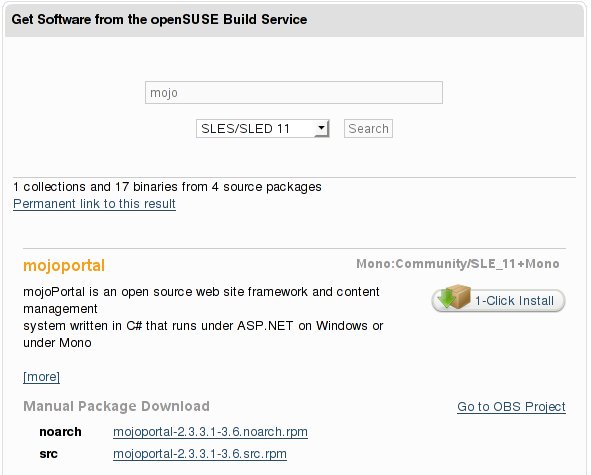
2) Download MojoPortal already packaged as an RPM from openSUSE.org. At the time of this entry, I downloaded and used mojoportal-2.3.3.1-3.6.noarch.rpm (12Mb) from this LINK. If link does not work, surf to http://software.opensuse.org/search and search for "mojo" with SLES/SLED 11 selected in the listbox.

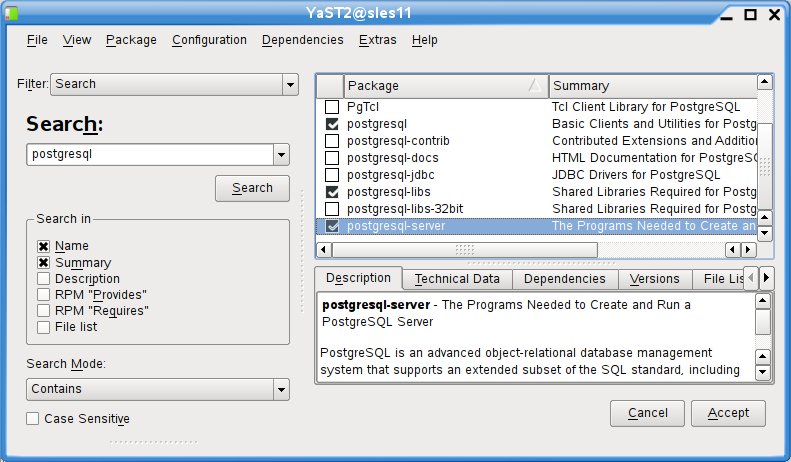
3) Install (if not already) Apache2 web server via YaST -> Software -> Software Management.
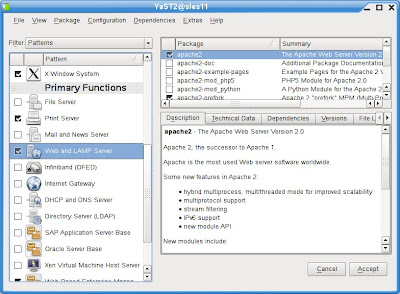

4) Install PostgresQL database via YaST -> Software -> Software Management.

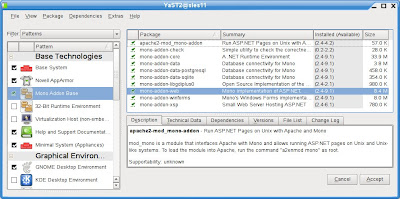
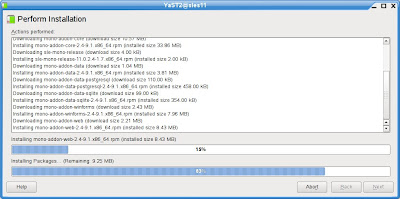
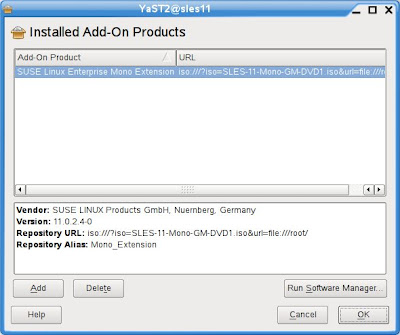
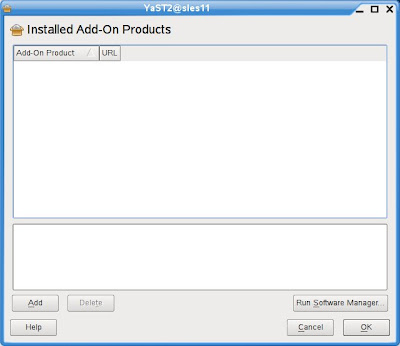
5) Install Mono Extension/runtime on top of SLES 11. Use YaST -> Software -> Add-On Products or < yast2 add-on > to install the Mono Extension, ISO you downloaded in step (1).


6) Install MojoPortal web application downloaded in step (2) with the following command executed as root: < rpm -ivh --nodeps mojoportal-2.3.3.1-3.4.noarch.rpm >. The nodeps flag is required as the mojoportal RPM is still looking for the older version 2.0 of Mono. The official SLE 11 Mono Extension is at version 2.4.

7) Ensure PostgreSQL server is running < rcpostgresql start >, and proceed to configure PostgreSQL database for MojoPortal: < /usr/share/mono/asp.net/data/mojoportal-2.3.3.1/init >

8) Configure Apache2 web server for MojoPortal: < cp /usr/share/mono/asp.net/conf/mojoportal-2.3.3.1/mojoportal.conf /etc/apache2/conf.d/ > and edit the mojoportal.conf file in the /etc/apache2/conf.d/ directory < gedit /etc/apache2/conf.d/mojoportal.conf >, put a # in front of the line < MonoServerPath mojoportal "/usr/bin/mod-mono-server2" > and remove the # in the following line < #MonoServerPath mojoportal "/opt/novell/mono/bin/mod-mono-server2" >.
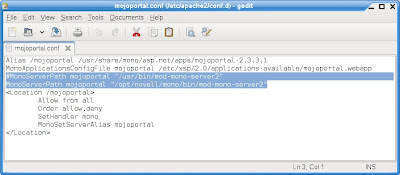
Restart Apache2 to have these configuration changes in effect < rcapache2 restart >.

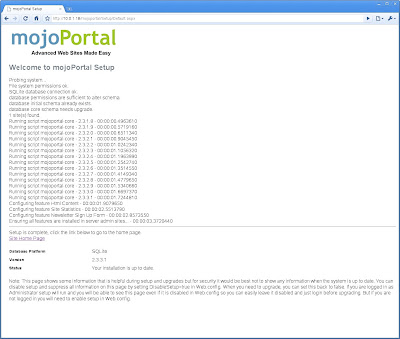
9) Open a web browser and point to http://[hostname Or IP addr]/mojoportal. The initial startup will take awhile as MojoPortal initializes for the first time. Login as MojoPortal Administrator with ID admin@admin.com and Password admin.

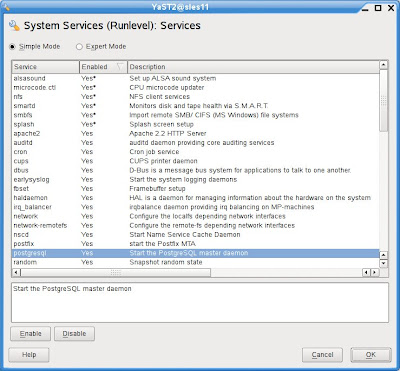
10) To ensure Apache2 web server and PostgreSQL database server is always auto-started on reboot, use YaST -> System -> System Services (Runlevel)

For more usage knowledge, please see MojoPortal.com for details at http://www.mojoportal.com/documentation.aspx
Go to http://software.opensuse.org/search and enter "mojoportal" in the text field and ensure you select SLES/SLED 11 in the drop-down box and click Search.

Cheers!
peace